Docker can run a hundred copies of the same image without storing it a hundred times. The trick is copy-on-write — and once you see the layer stack, it stops feeling like magic.
Start a container and you’d be forgiven for assuming Docker copies the image onto disk so the container has something to run against. It doesn’t. It shares one read-only copy across every container and hands each one a thin scratchpad on top. Files only get duplicated at the precise moment something tries to change them. That’s the whole idea behind copy-on-write, and it’s why containers start in milliseconds instead of minutes.
01 — An image is a stack of layers
A Docker image isn’t a single file. It’s a stack of read-only layers, each one the frozen result of a build step. When you launch a container, Docker doesn’t touch those layers at all — it lays a single writable layer on top and points the container at the combined view.
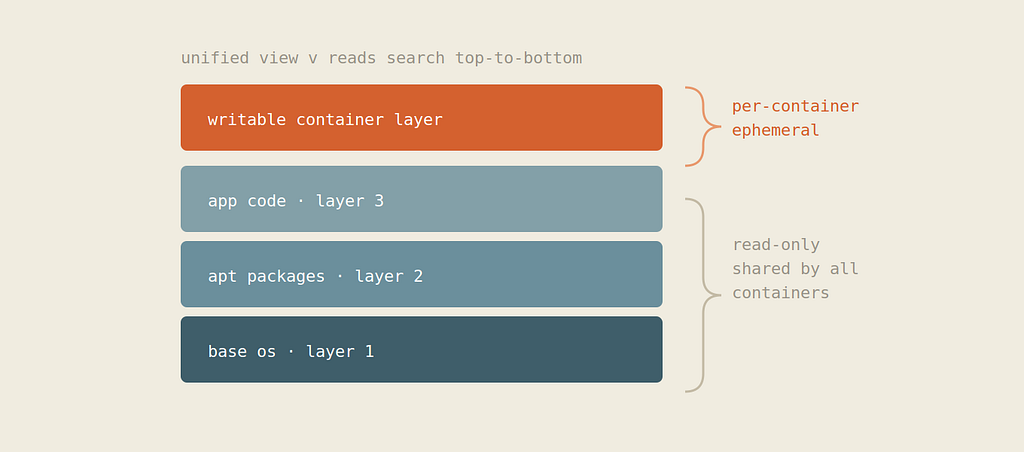
Run ten containers from this image and you get ten writable layers — but still just one set of read-only layers underneath, shared by all of them. A read for a file walks down the stack from the top and returns the first copy it finds.
02 — The copy waits for the first write
Here’s the part the name actually describes. As long as a file is only ever read, it’s served straight from the shared read-only layer. No duplication, no cost. The instant a container writes to a file that lives in a lower layer, the storage driver copies that file up into the writable layer first, then applies the change there. The original below stays pristine and stays shared.
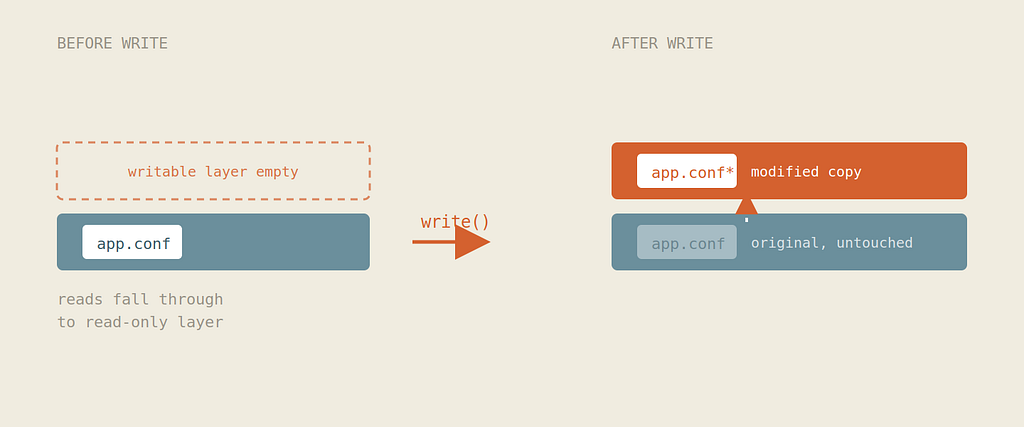
Granularity. With overlay2, the modern default driver, copy-up happens at the file level: writing a single byte to a 2 GB file copies the whole 2 GB up first. Older block-based drivers like devicemapper copy at the block level instead. This is the single biggest performance gotcha — and the reason write-heavy data belongs in a volume.
03 — Deleting just hides the file
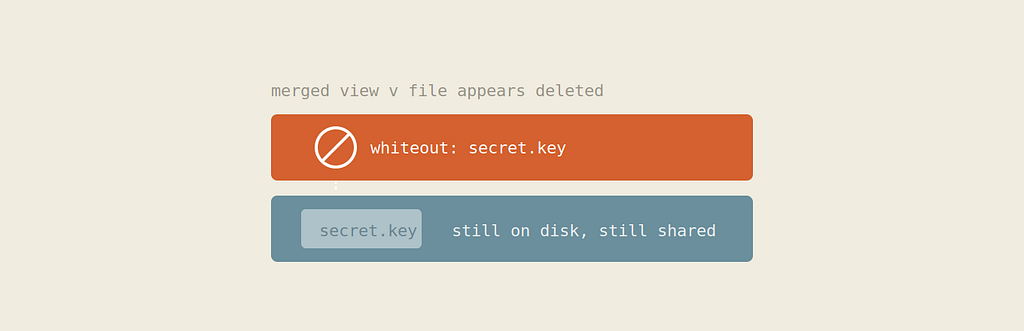
You can’t actually remove a file from a layer you don’t own. So when a container deletes a file that lives in a read-only layer below, the driver doesn’t reach down and erase it. It writes a small marker called a whiteout into the writable layer. The merged view honours the marker and pretends the file is gone — but the original is still sitting there, intact and shared.
04 — The technology underneath it
None of this is Docker’s invention. The layering, the copy-up, and the whiteouts are all the work of a kernel filesystem — on modern hosts, that’s OverlayFS, a union filesystem that has shipped in the Linux kernel since version 3.18 in 2014. Docker (really containerd beneath it) just asks the kernel to mount one, and the kernel enforces the rest. Any runtime — Podman, containerd, Docker — gets identical behavior because the behavior lives below all of them, in the VFS layer where every process sees one consistent merged view.
The mount itself is almost disarmingly simple. OverlayFS combines a few directories into one:
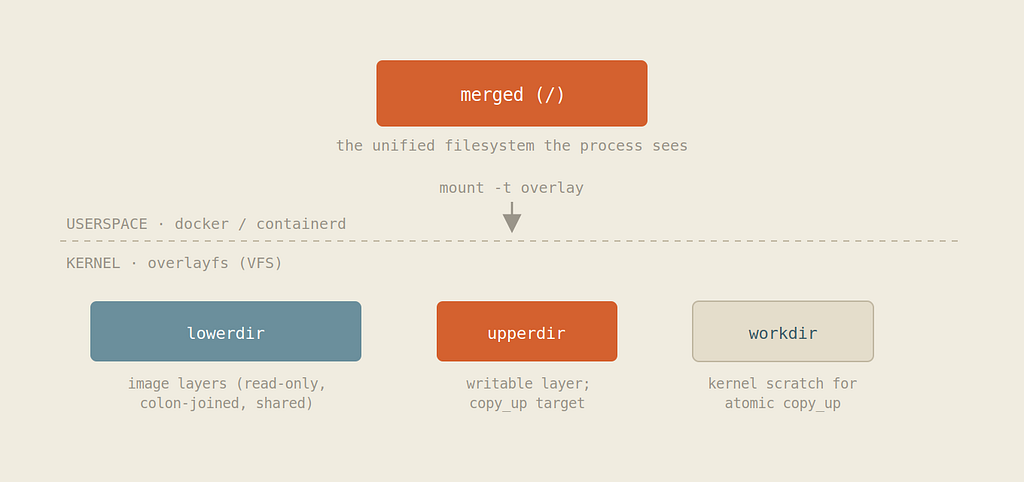
With that mount in place, the three behaviors from the earlier sections are just OverlayFS rules:
- A read is a lookup that checks upperdir first, then falls through the lower layers in order, returning the first hit.
- A write to a lower-layer file triggers copy_up: the kernel stages a full copy into upperdir (via workdir), then all further operations on that file hit the upper copy directly — the overlay barely notices it afterward.
- A delete of a lower-layer file can’t touch the read-only layer, so the kernel records a whiteout in upperdir — historically a 0/0 character device, and on newer kernels a zero-length file carrying a trusted.overlay.whiteout extended attribute. Deleting a whole directory marks it opaque with a similar xattr.
This lineage is worth knowing because OverlayFS wasn’t first. Earlier Docker installs leaned on AUFS, an out-of-tree union filesystem that never made it into the mainline kernel, and on block-level drivers like devicemapper (thin-provisioned, copy-on-write at the block rather than file level), btrfs, and zfs — each borrowing copy-on-write from a different kernel subsystem or filesystem. overlay2 won out because it’s in-tree, fast at the two-layer merge, and copies at file granularity. The throughline across all of them: the abstraction is enforced by the kernel, and the container runtime is mostly choreography on top.
05 — Why it’s worth the complexity
Three properties fall out of this design almost for free. Startup is instant, because launching a container means creating one empty layer, not copying an image. Disk stays small, because every container started from the same image shares those read-only layers byte-for-byte. And memory is shared too — since the lower layers are identical files on disk, the kernel’s page cache can serve the same pages to many containers at once.
The catch. Everything in the writable layer is ephemeral — it vanishes when the container is removed. And every modification to a lower-layer file pays the copy-up tax. Both point to the same conclusion: persistent or write-intensive data belongs in a volume or bind mount, which sidesteps the copy-on-write filesystem entirely and writes straight to the host.
So the next time a hundred containers spin up off one image in the blink of an eye, you’ll know what’s really happening underneath: not a hundred copies, but one shared stack, a hundred thin scratchpads, and a storage driver patiently waiting to copy a file only when something finally insists on changing it.
Why a thousand containers weigh almost nothing was originally published in Dev Genius on Medium, where people are continuing the conversation by highlighting and responding to this story.
Leave a Reply