If you’ve written more than a couple of Kubernetes manifests, you’ve probably copy-pasted these lines without thinking too hard about them:
apiVersion: v1        # Namespace, Service, Pod, ConfigMap...
apiVersion: apps/v1   # Deployment, StatefulSet, DaemonSet...Code language: PHP (php)
Why does a Namespace get a bare v1, while a Deployment gets apps/v1? It looks inconsistent, but it isn’t — the difference encodes a real piece of Kubernetes history and a deliberate design decision about how the API is allowed to evolve. Once you see the pattern, you’ll never have to guess again — and you’ll also understand why the same convention shows up in files that the Kubernetes API server never even touches, like kustomization.yaml.
apiVersion is really two pieces
The field is structured as <group>/<version>. There’s a special case: when a resource belongs to the core group, the group name is empty, so you drop it entirely and write just the version. That’s why v1 is really shorthand for “core group, version 1.”
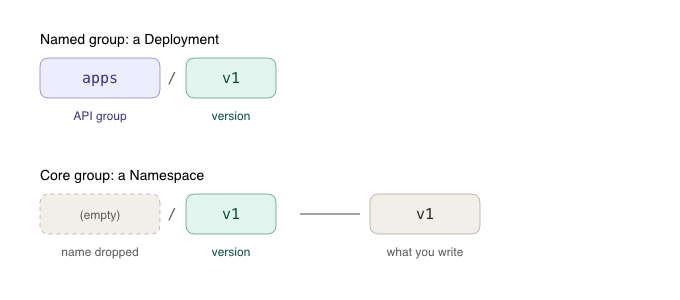
So these two are the same idea expressed differently:
- v1 → core group, v1
- apps/v1 → the apps group, v1
It’s not that some resources have a group and others don’t. Everything has a group. The core group just happens to be the one with an empty name, and the empty name disappears in the YAML.
A little history: how the API got organized
In the earliest days of Kubernetes, there was essentially one flat, monolithic API. All the foundational objects lived together with no notion of separate groups. That worked fine when there were only a handful of resource types, but it didn’t scale. As the project grew, everything sharing a single versioning timeline became a liability — you couldn’t evolve one corner of the API without dragging the entire surface along with it.
The answer was API groups: a way to partition resources into independently versioned namespaces. The original primitives stayed where they were (the core group), and new and reorganized resources were placed into named, themed groups. This is the system that gives us the <group>/<version> split we see today.
The core group: Kubernetes’ original primitives
The core group holds the foundational building blocks that shipped with Kubernetes from day one:
- Namespace
- Service
- Pod
- ConfigMap
- Secret
- PersistentVolume / PersistentVolumeClaim
- ServiceAccount, Node, Event
Because these existed before the group system was formalized, they were never relocated. They stayed in the core group, and they get the clean v1 label. You can think of v1 as a kind of grandfathered status — these objects are so fundamental and so stable that they never needed to move.
Named groups: everything organized by theme
As Kubernetes matured, resources were split into themed API groups so each could evolve on its own schedule:
- apps/v1 → workload controllers: Deployment, StatefulSet, DaemonSet, ReplicaSet
- batch/v1 → Job, CronJob
- networking.k8s.io/v1 → Ingress, NetworkPolicy
- rbac.authorization.k8s.io/v1 → Role, RoleBinding, and friends
- policy/v1 → PodDisruptionBudget
The naming itself tells a story. Short, unqualified group names like apps and batch are the early ones. The longer, domain-qualified names like networking.k8s.io and rbac.authorization.k8s.io reflect a later convention: groups got fully-qualified DNS-style names so that third parties could define their own groups (via Custom Resource Definitions) without ever colliding with the official Kubernetes ones. Your own CRDs follow the same pattern — something like mycompany.com/v1.
The Deployment saga: a tour through the version graveyard
No resource illustrates this evolution better than the humble Deployment. It didn’t start life in apps/v1 — it wandered through several homes before settling down:
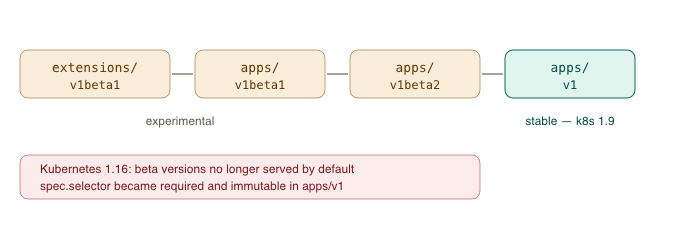
It first appeared in extensions/v1beta1 — the extensions group being an early catch-all bucket for experimental resources that hadn’t found a permanent home yet. As Deployments matured, they were promoted into the dedicated apps group and progressed through two more beta stages before graduating to a stable apps/v1 in Kubernetes 1.9.
Crucially, those weren’t just cosmetic renames. Each version bump was a chance to fix the schema. For example, in the stable apps/v1 version, spec.selector became required and immutable after creation — a meaningful, breaking change that simply could not have been made to a v1 API without violating Kubernetes’ stability promises. The beta versions existed precisely so that breaking changes like this could happen before the API was frozen.
The story doesn’t end with graduation, either. For years the cluster served the old beta endpoints alongside the new stable one for backward compatibility. Then, in Kubernetes 1.16, the project finally stopped serving the deprecated workload APIs by default — Deployment, DaemonSet, and ReplicaSet in extensions/v1beta1, apps/v1beta1, and apps/v1beta2 were no longer served, with apps/v1 as the replacement. A wave of broken helm upgrade runs followed for anyone who hadn’t migrated their manifests. Ingress went through a nearly identical arc, with its old extensions/v1beta1 endpoint removed in Kubernetes 1.22 in favor of networking.k8s.io/v1.
This whole lifecycle — alpha, then beta, then stable, then eventual removal of the old versions — is the entire reason the group/version system exists. It lets the project make hard changes in named groups while leaving the core v1 primitives untouched and rock-solid.
Why bother splitting it this way?
Three reasons make the grouping worth it:
- Independent versioning. The apps group can move forward on its own timeline without forcing Namespace or Service to change along with it. Each group evolves at its own pace.
- Stability signals. A bare v1 is the most stable tier and comes with strong compatibility guarantees. A suffix like v1beta1 is a clear warning that the schema may still shift under you, and an alpha version is more volatile still.
- Modularity and extensibility. Entire groups can be enabled or disabled at the API server level, and the DNS-style naming lets anyone add their own groups via CRDs without colliding with upstream.
The convention outgrew the API server
Here’s where it gets interesting. Look at the top of a kustomization.yaml:
apiVersion: kustomize.config.k8s.io/v1beta1
kind: Kustomization
resources:
  - ./base-sales.yaml
Same apiVersion/kind grammar, same <group>/<version> structure, same v1beta1 beta signal. But here’s the twist: no API server ever serves a Kustomization. It’s never stored in etcd. You can’t kubectl get kustomization. It’s a local config file that the kustomize tool (and kubectl apply -k) reads off disk to generate the real manifests, which are then the things that actually go to the cluster.
So why does a purely local config file borrow a convention designed for API server objects?
Because the convention turned out to be a fantastic general-purpose answer to the question “what schema is this YAML?” — completely independent of whether a server is involved. Any tool can read the top two lines and know unambiguously: this is a Kustomization, schema version v1beta1, owned by the kustomize.config.k8s.io group. Those two fields together form a globally unique, versioned type identifier. That gives a CLI tool exactly the same benefits the API server gets:
- kind lets one tool dispatch on multiple file types (Kustomize has Kustomization, Component, and various generator configs).
- apiVersion gives the tool a migration path. When Kustomize needs a breaking change to its config schema, it can bump v1beta1 → v1 and keep old files parsing under the old version — the same alpha → beta → stable lifecycle, just enforced by a binary instead of a server.
- the DNS-style group does the same collision-avoidance work as networking.k8s.io, staking out a namespace so this Kustomization can never be confused with anyone else’s.
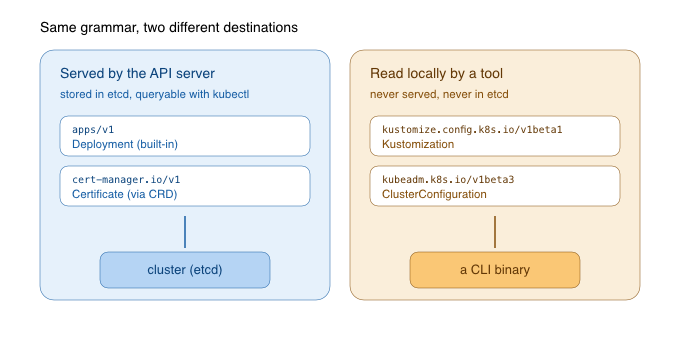
Once the pattern proved itself, the whole cloud-native ecosystem adopted it — for things that are served and things that never are:
- Kustomize → kustomize.config.k8s.io/v1beta1, kind Kustomization — local, never served.
- kubeadm → kubeadm.k8s.io/v1beta3, kinds like ClusterConfiguration — pure install-time config, consumed by the kubeadm binary.
- kubectl → client.authentication.k8s.io/v1, kind ExecCredential — the format an exec-auth plugin prints to stdout.
- Argo CD, Flux, cert-manager, and friends go the other way — they register real CRDs (argoproj.io/v1alpha1 kind Application, cert-manager.io/v1 kind Certificate) so their objects genuinely are served by the API server, backed by a group registered through a CustomResourceDefinition.
So there are really two distinct things wearing the same costume. The first is the system this whole post has been about: real resources, served and stored. The second is what happens when a good design convention becomes a de facto standard — tool authors reach for apiVersion/kind because it hands them free versioning, namespacing, and a familiar shape, even when there’s no server on the other end at all.
And that’s why your kustomization.yaml carries v1beta1: it’s the same signal it is everywhere else. The Kustomize team is reserving the right to evolve the config schema. In practice it’s been extremely stable for years, but the beta label keeps the door open for an eventual cleaner kustomize.config.k8s.io/v1, while every existing file keeps parsing under the version it declared.
The rule of thumb
Primitives = v1. Controllers and extensions = <group>/<version>. And any tool that reads YAML may borrow the same grammar — even when no API server is involved.
If a resource is one of the original building blocks, it gets the bare version. If it’s a controller or a newer feature, it lives in a named group and carries the group prefix. And if you’re ever unsure which group and version a served resource type currently lives in, your cluster will tell you directly:
kubectl api-resources      # every resource type with its API group
kubectl api-versions       # every group/version your cluster servesCode language: PHP (php)
(Note that neither command will list Kustomization — that’s your reminder that it lives entirely on the client side.)
Next time you reach for apiVersion, you’ll know exactly why the line reads the way it does — what it’s quietly telling you about how stable, how old, and how battle-tested that resource is, and whether there’s an API server on the other end of it at all.
Leave a Reply