Skip NFS-in-a-pod, skip Ceph. Longhorn gives you distributed, replicated storage on bare metal in under 10 minutes.
The Setup
I run a private Kubernetes cluster out of my apartment. Three Skullcandy CoreX Pro mini PCs as control plane and workers, one Raspberry Pi 5 as a lightweight worker, and a Pi 4 running Pi-hole for DNS. MicroK8s ties it all together. The cluster runs ERPNext, a GitLab runner, a container registry, and a few internal tools — nothing exotic, but enough that storage decisions actually matter.
The problem I hit was straightforward. MicroK8s ships with hostpath-storage, which writes data to a directory on whatever node the pod lands on. It’s ReadWriteOnce — one pod at a time, one node, no replication. If that node’s NVMe dies, the data is gone. And if you need multiple pods reading and writing the same volume simultaneously (ReadWriteMany), hostpath can’t do it at all.
ERPNext needs both. Its web server, background workers, and scheduler all mount the same shared sites directory. And I’d prefer that directory to survive a node failure without me scrambling to restore from a backup at 2am.
Why Longhorn (and Why Not the Others)
Why not Rook-Ceph?
Ceph is the enterprise answer to distributed storage. It’s also designed for clusters with 10+ nodes and dedicated storage drives. It wants raw disks (not partitions sharing space with the OS), runs monitor daemons that eat 1–2GB RAM each, and OSD daemons that comfortably consume 4–8GB per disk. On a 3-node cluster with 24GB per node and shared OS disks, Ceph would claim a meaningful chunk of resources just to exist. MicroK8s ships with a rook-ceph addon, which makes installation one command — but the resource appetite doesn’t change with the packaging.
Why not Mayastor?
NVMe-optimized, and MicroK8s has an addon for it. Faster I/O than Longhorn in benchmarks, but hungrier on resources and wants dedicated NVMe drives. If you’re running database-heavy workloads locally, Mayastor earns its keep. My databases live in GCP — the local cluster is pure compute. Overkill.
Why not NFS-in-a-pod?
The commonly recommended nfs-ganesha-server-and-external-provisioner Helm chart runs an NFS server inside a Kubernetes pod, backed by a single PVC. The irony: you end up with the same single-disk durability as hostpath — data on one node, no replication — but with an extra network hop and an extra failure mode sitting in between. If the NFS pod crashes or gets rescheduled, every pod mounting that volume hangs. The docs themselves recommend it for trying things out, not production.
Why Longhorn
Longhorn is built for exactly this situation: small bare-metal clusters, 3–5 nodes, shared OS disks, homelab to small production. It stores replica data as files inside a regular directory on each node’s existing filesystem — no raw partitions, no dedicated drives. It replicates across nodes automatically (configurable replica count), handles both RWO and RWX, has a built-in web UI for managing volumes and snapshots, and installs via Helm. The storage engine runs as lightweight Go binaries that collectively use under 1GB of RAM across all three nodes.
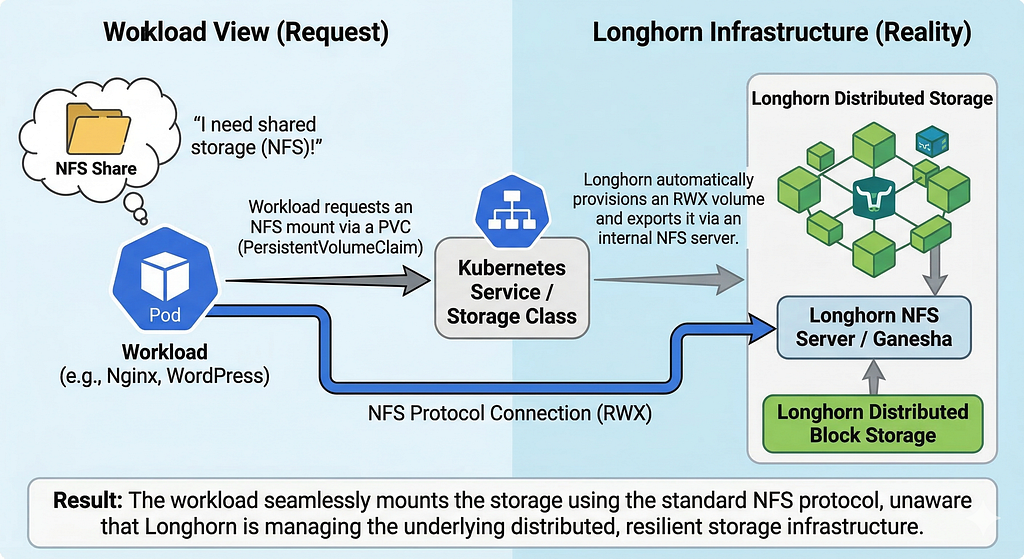
For RWX specifically, Longhorn creates a small internal NFS server per RWX volume, backed by replicated block storage. You never configure NFS directly — Longhorn manages it. You just request accessModes: [ReadWriteMany] in your PVC and it handles the rest.
Installation
Step 1: Install Prerequisites on Each Storage Node
SSH into each of the three ss nodes and run:
sudo apt install -y open-iscsi nfs-common
sudo systemctl enable iscsid --now
open-iscsi provides the iSCSI initiator — the protocol Longhorn uses to attach block devices across the network. When a volume’s data lives on ss-02’s NVMe but the pod using it runs on ss-01, iSCSI makes that remote storage appear as a local block device. The pod has no idea it’s reading from another machine’s disk. Think of it as a very long SATA cable that runs across your network.
nfs-common is needed for RWX volumes. Skip the Pi if you’re excluding it from storage.
Step 2: Install Longhorn via Helm
sudo microk8s helm repo add longhorn https://charts.longhorn.io
sudo microk8s helm repo update

sudo microk8s helm install longhorn longhorn/longhorn \
  --namespace longhorn-system \
  --create-namespace \
  --set defaultSettings.defaultDataPath="/longhorn" \
  --set defaultSettings.defaultDataLocality="best-effort" \
  --set defaultSettings.defaultReplicaCount=3 \
  --set csi.kubeletRootDir="/var/snap/microk8s/common/var/lib/kubelet" \
  --set persistence.defaultClassReplicaCount=3Code language: JavaScript (javascript)
Critical: The csi.kubeletRootDir flag is the one MicroK8s-specific gotcha. MicroK8s puts kubelet in /var/snap/microk8s/common/var/lib/kubelet instead of the standard /var/lib/kubelet. Without this, the Longhorn CSI driver can’t find kubelet and every CSI pod crashes on startup.
What the other flags do:
- defaultDataPath=”/longhorn” — where Longhorn stores replica data on each node’s disk. Creates /longhorn at root. Just a regular directory on your existing filesystem.
- defaultDataLocality=”best-effort” — keeps one replica on the same node as the pod using the volume. Reduces network hops for reads.
- defaultReplicaCount=3 — with exactly 3 storage nodes, every volume exists on every node. Maximum resilience.
Step 3: Exclude the Pi from Storage
The Pi 5 has 8GB RAM and is ARM64. Not ideal for running storage engine processes:
kubectl label nodes rpifive node.longhorn.io/create-default-disk=falseCode language: JavaScript (javascript)Step 4: Wait for Pods
kubectl get pods -n longhorn-systemCode language: JavaScript (javascript)Expect around 28 pods. Sounds like a lot, but each is a small Go binary with a specific job:
- 3x longhorn-manager — one per node, the brain that manages volumes, replicas, and scheduling
- 3x engine-image — one per node, the actual storage engine binary that handles reads and writes
- 3x instance-manager — one per node, supervises I/O worker processes
- 3x longhorn-csi-plugin — one per node, bridges Kubernetes PVC requests to Longhorn
- 12x CSI sidecars — csi-attacher, csi-provisioner, csi-resizer, csi-snapshotter at 3 replicas each. Standard Kubernetes CSI components, not Longhorn-specific. Every CSI driver needs them.
- 1x driver-deployer — one-time setup
- 2x longhorn-ui — the web dashboard
Total memory footprint across all of them is typically under 1GB.
Step 5: Remove hostpath as Default StorageClass
Longhorn registers itself as the default StorageClass. If hostpath is also marked as default, you’ll have two defaults and Kubernetes won’t know which to pick:
kubectl patch storageclass microk8s-hostpath \
  -p '{"metadata": {"annotations":{"storageclass.kubernetes.io/is-default-class":"false"}}}'Code language: JavaScript (javascript)
Verify only longhorn shows (default):
kubectl get storageclassCode language: JavaScript (javascript)Step 6: Test It
kubectl create namespace test-longhorn

cat <<EOF | kubectl apply -f -
apiVersion: v1
kind: PersistentVolumeClaim
metadata:
  name: test-pvc
  namespace: test-longhorn
spec:
  accessModes:
    - ReadWriteOnce
  resources:
    requests:
      storage: 1Gi
EOF

kubectl get pvc -n test-longhornCode language: JavaScript (javascript)
Should show Bound within seconds. Clean up after:
kubectl delete namespace test-longhornCode language: JavaScript (javascript)Using Longhorn for RWX (the NFS Part)
This is why I chose Longhorn over simpler options. Creating an RWX volume is identical to creating an RWO one — you just change the access mode:
apiVersion: v1
kind: PersistentVolumeClaim
metadata:
  name: shared-sites
  namespace: my-app
spec:
  accessModes:
    - ReadWriteMany
  storageClassName: longhorn
  resources:
    requests:
      storage: 5GiCode language: PHP (php)
Behind the scenes, Longhorn provisions a replicated block volume, then spins up a small share-manager pod that exposes it over NFS. Pods across different nodes can mount this PVC simultaneously. You never touch NFS configuration, never install an NFS server, never manage exports. Longhorn handles the lifecycle entirely.
Important: Longhorn’s RWX is backed by replicated storage. If the node hosting the share-manager pod goes down, Longhorn automatically relocates it to another node. The underlying data survives because it’s replicated across all three nodes. This is fundamentally different from running nfs-ganesha on top of a non-replicated hostpath PVC.
Migrating Existing Workloads from Hostpath
If you have workloads on hostpath-storage, migration is a scale-down-and-swap:
# Scale down the workload
kubectl scale deployment my-app -n my-namespace --replicas=0Code language: PHP (php)
# Delete the old PVC (data is lost — back up first if it matters)
kubectl delete pvc my-claim -n my-namespaceCode language: PHP (php)# Create new PVC on Longhorn with the same name
cat <<EOF | kubectl apply -f -
apiVersion: v1
kind: PersistentVolumeClaim
metadata:
name: my-claim
namespace: my-namespace
spec:
accessModes:
- ReadWriteOnce
storageClassName: longhorn
resources:
requests:
storage: 20Gi
EOFCode language: PHP (php)# Scale back up
kubectl scale deployment my-app -n my-namespace --replicas=1Code language: PHP (php)For workloads where the data is expendable (like a container registry that repopulates on next image push), this takes 30 seconds. For workloads with real data, dump and restore around the PVC swap.
Things You Need to Get Right
- Install open-iscsi on every storage node before Longhorn. Without it, Longhorn can’t attach volumes to pods and you’ll get cryptic mount errors at runtime, not at install time.
- Set csi.kubeletRootDir for MicroK8s. The CSI driver won’t start without it. This is the number one reason Longhorn installs fail on MicroK8s.
- Exclude ARM64 nodes from storage if they’re low on RAM. Longhorn’s per-node storage engine processes add overhead that an 8GB Pi doesn’t need. Label them with node.longhorn.io/create-default-disk=false.
- Remove the default flag from hostpath-storage. Two default StorageClasses means Kubernetes picks one unpredictably when a PVC doesn’t specify a class explicitly.
- Set replica count to match your node count. With 3 nodes and 3 replicas, every volume is on every node. Maximum resilience, no capacity waste on a small cluster.
- Longhorn stores data as files, not raw partitions. It uses your existing filesystem at the configured defaultDataPath. No need for unpartitioned disks, no need to repartition anything.
- Longhorn supports live volume expansion. If a PVC runs low, just patch it: kubectl patch pvc my-pvc -p ‘{“spec”:{“resources”:{“requests”:{“storage”:”10Gi”}}}}’. No downtime.
Troubleshooting
Symptom:
longhorn-csi-plugin CrashLoopBackOff
"failed to get arg root-dir"Code language: JavaScript (javascript)
Cause: Longhorn can’t find kubelet at the default path. Fix:
sudo microk8s helm upgrade longhorn longhorn/longhorn \
  --namespace longhorn-system \
  --set csi.kubeletRootDir="/var/snap/microk8s/common/var/lib/kubelet"Code language: JavaScript (javascript)
Symptom:
longhorn-manager Error / CrashLoopBackOff immediately after install
"the object has been modified; please apply your changes to the latest version"Code language: JavaScript (javascript)
Cause: Race condition — multiple manager instances try to update the same setting simultaneously on first boot. Fix: Wait 60 seconds. Kubernetes restarts the crashed pod and it recovers on its own. No action needed.
Symptom:
PVC stuck in PendingCause: Longhorn manager hasn’t finished initializing, or no storage nodes are available. Fix: Check kubectl get nodes.longhorn.io -n longhorn-system. All storage nodes should show READY: True and SCHEDULABLE: True. If a node is missing, verify open-iscsi is installed and iscsid is running on that node.
Symptom:
v1 Endpoints is deprecated in v1.33+Code language: CSS (css)Cause: Kubernetes 1.33 deprecation warning. Longhorn still uses v1 Endpoints internally. Fix: Ignore it. It’s a warning, not an error. Longhorn works fine. They’ll update it in a future release.
What’s Next
Longhorn is running. The cluster has replicated storage with RWX support and a web UI I can port-forward to when I want to feel like a real sysadmin. Next step is deploying ERPNext on top of it — MariaDB on a Longhorn RWO volume, the shared sites directory on a Longhorn RWX volume, and three separate tenant sites for three separate businesses all served from the same set of pods.
28 pods just to store files. My NVMe drives have more babysitters than a daycare center.
Longhorn on MicroK8s: Replicated Storage for a 4-Node Homelab Cluster was originally published in Dev Genius on Medium, where people are continuing the conversation by highlighting and responding to this story.
Leave a Reply