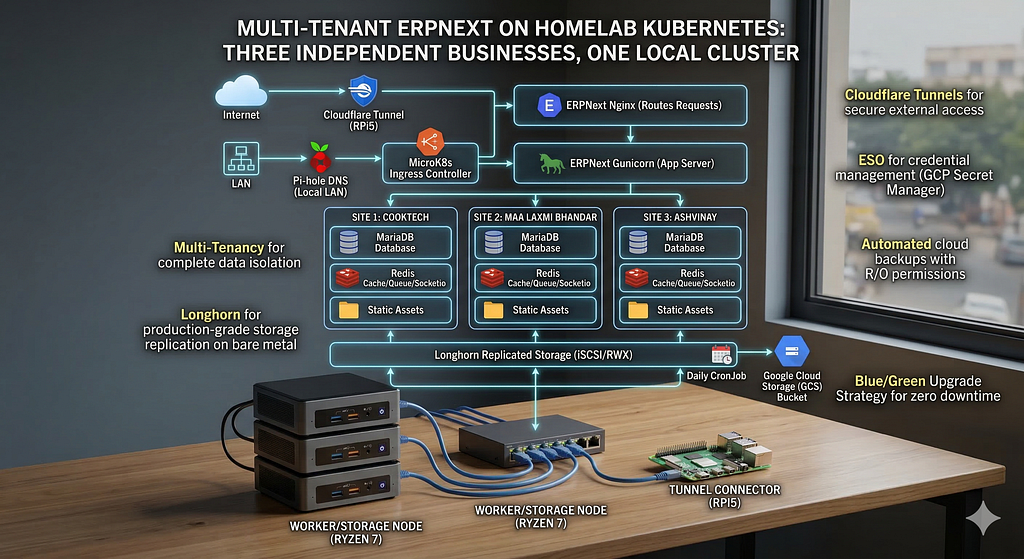
Running three independent businesses on one homelab K8s deployment — with replicated storage, automated cloud backups, and zero vendor lock-in.
What We Set Out To Do
The goal was deceptively simple: run ERPNext for three completely independent businesses — a tech company (Cooktech), a commodity trading business (Maa Laxmi Bhandar), and a home services company (Ashvinay) — on a homelab Kubernetes cluster. Each business needed complete data isolation, its own domain, and independent access. The system had to be resilient enough that a dead node wouldn’t mean lost data, and pragmatic enough that a single person could manage it.
The constraints were real. Three mini PCs (Ryzen 7, 24GB RAM each) and a Raspberry Pi 5 as a fourth worker node. No cloud compute budget. No managed databases. No storage-area network. Everything had to run on commodity hardware sitting on a desk in Ranchi.
The ambition was equally real: production-grade storage replication, automated offsite backups to Google Cloud, external access through Cloudflare tunnels, local LAN access with proper DNS, and an upgrade strategy that doesn’t require downtime or prayers.
This is the story of how it all came together.
The Architecture
Before diving into the how, it helps to understand the shape of the system:
Internet                          LAN
   │                               │
Cloudflare                      Pi-hole DNS
   │                               │
Cloudflare Tunnel              MicroK8s Ingress
(runs on RPi5)                 (runs on all nodes)
   │                               │
   └──────────┬────────────────────┘
              │
    ERPNext nginx (serves static assets)
              │
    ERPNext gunicorn (Python web server)
              │
   ┌──────────┼──────────────┐
   │          │              │
MariaDB    3x Redis     Background Workers
(Longhorn   (cache,     (default, short,
 replicated  queue,      long, scheduler)
 storage)    socketio)Code language: JavaScript (javascript)
Three sites live inside one ERPNext deployment. Each site has its own MariaDB database, its own users, its own configuration. The compute layer — gunicorn, workers, scheduler — is shared. Nginx routes requests to the correct site based on the hostname in the HTTP request.
External users reach the system through Cloudflare tunnels. Local users on the LAN reach it through Pi-hole DNS resolving .lan domains to the ingress controller. Both paths converge at the same ERPNext service inside Kubernetes.
Why These Technical Choices
MicroK8s, Not K3s or Full Kubernetes
MicroK8s is a single-binary Kubernetes distribution from Canonical that installs via snap. It comes with batteries included — addons for DNS, ingress, metrics, storage, and more can be enabled with one command. For a homelab where you’re both the developer and the sysadmin, this matters. K3s is equally lightweight but MicroK8s had better documentation for multi-node HA clusters at the time, and the addon ecosystem meant fewer Helm charts to manage manually.
Longhorn for Storage
Kubernetes on bare metal has a storage problem. Cloud providers give you elastic block storage with a checkbox. On bare metal, you need to build it yourself.
The options we evaluated:
Rook-Ceph is the enterprise answer. It wants dedicated disks (not partitions sharing space with the OS), at least three monitor daemons eating 1–2GB RAM each, and OSD daemons that comfortably consume 4–8GB RAM per disk. On three nodes with 24GB each, Ceph would claim a meaningful chunk of resources just to exist.
Mayastor is NVMe-optimized and MicroK8s has an addon for it. Also hungry on resources and wants dedicated NVMe drives.
NFS-in-a-pod (nfs-ganesha) runs an NFS server inside a Kubernetes pod, backed by a single PVC. The irony: it gives you the same single-disk durability as hostpath, but with an extra network hop and failure mode.
Longhorn is built specifically for small bare-metal clusters. It replicates data across nodes as regular files (no raw partitions needed), has a built-in web UI, supports both ReadWriteOnce and ReadWriteMany volumes, and installs via Helm. The storage engine runs as lightweight Go binaries that collectively use under 1GB of RAM across all three nodes.
Longhorn won because it matched our constraints: small cluster, shared OS disks, homelab to small production workloads.
One MicroK8s-specific gotcha: Longhorn can’t find kubelet because MicroK8s puts it in a non-standard path. You must pass csi.kubeletRootDir=/var/snap/microk8s/common/var/lib/kubelet during the Helm install. Without this, the CSI driver won’t start and you’ll spend an hour reading unhelpful error messages.
Bench Multi-Tenancy, Not Multi-Company or Separate Deployments
ERPNext has two completely different concepts that people often confuse.
Multi-Company is a feature within a single ERPNext site. You create Cookytech, MLB, and Ashvinay as three companies in one database. Users log in to the same URL and see data filtered by company assignment. The catch: data isolation isn’t airtight. Users of one company can potentially see customers and suppliers of another unless you meticulously configure User Permissions. It’s designed for related businesses (parent/child companies), not truly independent ones.
Multi-Tenancy is a Frappe framework feature. Each business gets its own site — its own database, its own URL, its own administrator account. Complete data isolation by design. The sites share the same code base and the same running pods, but data never crosses between them.
For three completely independent businesses, multi-tenancy was the only real option. The shared compute layer means we’re not tripling our resource usage — one set of gunicorn workers, one scheduler, one MariaDB instance (with separate databases inside it) serves all three.
Official Helm Chart, Not Custom Manifests
We initially attempted custom Kubernetes manifests for ERPNext. This seemed like the “learn more” approach. It was the “learn pain” approach.
The ERPNext Docker image has a specific expectation about how its volume mounts work. The sites directory inside the container comes pre-populated with apps.txt, common_site_config.json, and other files. When you mount a fresh PVC at that path, it overwrites everything. The official Helm chart handles this with a configure job that runs first to populate the volume correctly. It also creates a separate emptyDir mount for logs at /home/frappe/frappe-bench/logs, which the application expects but doesn’t create on its own.
After two hours of debugging CrashLoopBackOff errors caused by missing apps.txt and missing log directories, we switched to the official chart. It deployed cleanly on the first try. The lesson: use the official tooling for complex applications and learn by reading and customizing the chart, not by reinventing it.
External Secrets Operator for Credentials
No secret should ever exist in a YAML file, a Git repo, or a human’s memory. Every credential in this system lives in Google Cloud Secret Manager and gets pulled into the cluster by the External Secrets Operator (ESO).
The architecture uses two GCP projects, each with its own ClusterSecretStore:
- cookytech-infra → GitLab runner token, Cloudflare tunnel token
- mlb-erpnext → MariaDB passwords, backup service account key
Each project has a service account with secretmanager.secretAccessor role. The SA keys are the only manually-created secrets in the cluster — everything else flows through ESO automatically.
Cloudflare Tunnels for External Access
A homelab has no public IP (or at best, a dynamic one behind carrier-grade NAT). Cloudflare Tunnels solve this by running a connector inside your network that establishes an outbound connection to Cloudflare’s edge. Traffic flows: user → Cloudflare → tunnel → your service. No port forwarding, no dynamic DNS, no exposed attack surface.
The tunnel connector (cloudflared) runs as a Kubernetes Deployment pinned to the Raspberry Pi 5 using a node selector and toleration. The Pi has a taint (role=tunnel:NoSchedule) that prevents other workloads from landing on it, and the cloudflared deployment has a matching toleration so it can schedule there.
Why the Pi? It’s 8GB RAM and ARM64 — not ideal for running ERPNext workers or Longhorn storage, but perfect for a lightweight tunnel connector that just proxies HTTP traffic.
Step by Step
Prerequisites
On each storage node (the three x86 machines):
sudo apt install -y open-iscsi nfs-common
sudo systemctl enable iscsid --now
open-iscsi provides the iSCSI initiator — this is how Longhorn attaches block devices across the network. When a volume’s data lives on node B but the pod runs on node A, iSCSI makes that remote storage appear as a local block device. The pod has no idea it’s reading from another machine.
nfs-common is needed for ReadWriteMany volumes. Longhorn handles RWX by spinning up a small internal NFS server per RWX volume.
Install Longhorn
sudo microk8s helm repo add longhorn https://charts.longhorn.io
sudo microk8s helm repo update

sudo microk8s helm install longhorn longhorn/longhorn \
  --namespace longhorn-system \
  --create-namespace \
  --set defaultSettings.defaultDataPath="/longhorn" \
  --set defaultSettings.defaultDataLocality="best-effort" \
  --set defaultSettings.defaultReplicaCount=3 \
  --set csi.kubeletRootDir="/var/snap/microk8s/common/var/lib/kubelet" \
  --set persistence.defaultClassReplicaCount=3Code language: JavaScript (javascript)
Exclude the Pi from storage duties:
kubectl label nodes rpifive node.longhorn.io/create-default-disk=falseCode language: JavaScript (javascript)Demote the old default StorageClass:
kubectl patch storageclass microk8s-hostpath \
  -p '{"metadata": {"annotations":{"storageclass.kubernetes.io/is-default-class":"false"}}}'Code language: JavaScript (javascript)
Deploy MariaDB
A StatefulSet with a Longhorn-backed PVC. The key configuration is the utf8mb4 character set — ERPNext requires it and won’t function without it.
# ConfigMap with MariaDB configuration
data:
  erpnext.cnf: |
    [mysqld]
    character-set-client-handshake = FALSE
    character-set-server = utf8mb4
    collation-server = utf8mb4_unicode_ci
    skip-name-resolve
    max_allowed_packet = 256MCode language: PHP (php)
The root password comes from a Kubernetes Secret synced by ESO from GCP Secret Manager. The password was generated with openssl rand -base64 24 and piped directly into Secret Manager — no human ever saw or typed it.
Deploy Redis
Three separate Redis instances, each with a distinct role:
- Cache (–maxmemory 256mb –maxmemory-policy allkeys-lru) — caches frequently accessed data. When it fills up, it evicts the least recently used keys automatically.
- Queue — holds background job tasks for workers to pick up. No eviction policy because you don’t want to lose pending jobs.
- Socketio — passes realtime events between the server and your browser.
All three are Deployments (not StatefulSets) with no persistent storage. If they restart, they rebuild from scratch. Redis data in this context is ephemeral.
Install ERPNext via Helm
sudo microk8s helm install frappe-bench frappe/erpnext \
  --namespace erpnext-16 \
  -f ~/erpnext-custom-values.yaml
The custom values file disables all bundled databases (we have our own) and points ERPNext at our MariaDB and Redis services:
dbHost: "mariadb.erpnext-16.svc.cluster.local"
externalRedis:
  cache: "redis://redis-cache.erpnext-16.svc.cluster.local:6379"
  queue: "redis://redis-queue.erpnext-16.svc.cluster.local:6379"Code language: JavaScript (javascript)
Create Sites
kubectl exec -it deploy/frappe-bench-erpnext-worker-d -n erpnext-16 -- \
  bench new-site erp.cookytech.in --install-app erpnext \
  --db-root-password "$ROOT_PW" --admin-password "$ADMIN_PW"Code language: JavaScript (javascript)
Repeat for each site. After each creation, immediately fix the MariaDB user:
RENAME USER '<generated_user>'@'<pod_ip>' TO '<generated_user>'@'%';
FLUSH PRIVILEGES;Code language: JavaScript (javascript)
This is critical — see the troubleshooting section for why.
Then enable the scheduler for each site:
kubectl exec -it deploy/frappe-bench-erpnext-worker-d -n erpnext-16 -- \
  bench --site erp.cookytech.in enable-scheduler
Configure Access
Cloudflare tunnel routes (configured in the Zero Trust dashboard):
Each domain points to the same internal service URL: http://frappe-bench-erpnext.erpnext-16.svc.cluster.local:8080. The cloudflared pod resolves Kubernetes service DNS directly since it runs inside the cluster.
LAN access uses separate .lan domains to avoid DNS cache conflicts:
Pi-hole resolves erp-cookytech.lan to a node IP. The MicroK8s ingress controller (running as a DaemonSet on all nodes) picks up the request. A per-domain Ingress resource uses nginx.ingress.kubernetes.io/upstream-vhost to rewrite the Host header from erp-cookytech.lan to erp.cookytech.in before forwarding to ERPNext. ERPNext never knows the .lan domain exists — it only sees the real domain name.
Why separate domains instead of the same domain resolving differently on LAN vs internet? Because if Pi-hole resolves erp.cookytech.in to a local IP, but your browser has cached the Cloudflare IP (or vice versa), you get inconsistent behavior across browsers. Each browser maintains its own DNS cache, and the results are maddening.
Automated Backups
A CronJob runs daily at 2am:
- An init container running the ERPNext image executes bench backup –with-files for each site
- The main container running google/cloud-sdk:alpine authenticates with a service account and uploads everything to a GCS bucket
- The service account has storage.objectCreator role only — it can write but not delete. This protects against ransomware or accidental deletion. The bucket has a 30-day lifecycle policy that auto-deletes old backups.
Things to Get Right
- Longhorn kubelet path on MicroK8s — without csi.kubeletRootDir=/var/snap/microk8s/common/var/lib/kubelet, the CSI driver can’t find kubelet and nothing works.
- MariaDB user host fix after bench new-site — ERPNext creates a database user restricted to the specific IP of the pod that ran the command. Other pods (gunicorn, workers) have different IPs and get “Access denied.” Rename the user to @’%’ immediately after site creation.
- utf8mb4 character set — ERPNext requires character-set-server=utf8mb4 and collation-server=utf8mb4_unicode_ci. Without these in your MariaDB config, site creation will fail with cryptic encoding errors.
- Use the official Helm chart — the ERPNext Docker image expects specific volume mount patterns (sites directory, logs directory, apps.txt). The chart’s configure job handles all of this. Don’t reinvent it.
- Separate .lan domains for LAN access — don’t put real domains in Pi-hole. The DNS cache conflicts between Cloudflare resolution and local resolution will drive you insane.
- Enable scheduler after site creation — bench new-site creates the site with the scheduler disabled. Without it, no background tasks fire — no emails, no scheduled reports, no auto-repeat invoices.
- Longhorn replica count matches node count — with 3 storage nodes, set defaultReplicaCount=3 so every volume exists on every node. Maximum resilience.
- Exclude ARM nodes from Longhorn — the Raspberry Pi doesn’t have the storage capacity or I/O performance for Longhorn duties. Label it with node.longhorn.io/create-default-disk=false.
Troubleshooting Guide
Pods stuck in CrashLoopBackOff after deploying ERPNext
Check the logs: kubectl logs deploy/<pod> -n <namespace> –previous
Common causes:
- Missing apps.txt — the sites PVC mount overwrites the image’s built-in files. The Helm chart’s configure job should create this. If you’re using custom manifests, you need to handle it yourself.
- Missing logs directory — ERPNext expects /home/frappe/frappe-bench/logs to be writable. Mount an emptyDir there.
- FileNotFoundError for /home/frappe/logs — gunicorn specifically looks for this path. The official chart handles this; custom manifests need a separate emptyDir mount.
“Access denied for user” after creating a site
The MariaDB user was created with a host restriction matching the worker pod’s IP. Run:
SELECT user, host FROM mysql.user
WHERE host NOT IN ('%', 'localhost', '127.0.0.1', '::1');Code language: JavaScript (javascript)
Then rename each restricted user:
RENAME USER '<user>'@'<pod_ip>' TO '<user>'@'%';
FLUSH PRIVILEGES;Code language: JavaScript (javascript)
Longhorn PVC stuck in Pending
Check if Longhorn pods are all running: kubectl get pods -n longhorn-system. The RWX provisioning takes longer than RWO because Longhorn needs to create an internal NFS share manager. Wait 30-60 seconds.
Cloudflared pod stuck in Pending
If rpifive has a taint, the cloudflared deployment needs a matching toleration. Check: kubectl describe node rpifive | grep Taints. Add the toleration to the deployment spec.
.lan domains show as Google search in browser
Type the full URL including the scheme: http://erp-cookytech.lan/. Browsers treat bare .lan hostnames as search queries.
Sites not accessible after namespace recreation
Remember to recreate ExternalSecrets, MariaDB, Redis, Helm release, ingress resources, and backup CronJob. Also recreate sites with bench new-site and fix DB user hosts.
Key Learnings
Start with the official tooling. We spent hours debugging custom manifests for ERPNext before switching to the official Helm chart, which worked on the first try. The chart encodes years of operational knowledge about volume mounts, init containers, and configuration jobs. Learn by reading the chart templates, not by reimplementing them.
Secrets management is worth the upfront investment. Setting up ESO with three GCP projects and ClusterSecretStores felt like over-engineering at the time. But once it’s running, adding a new secret to the cluster is two commands: one to create it in GCP, one to create an ExternalSecret manifest. No key files, no base64 encoding, no “where did I put that password.”
Longhorn is the right storage for small clusters. It does exactly what it promises with minimal fuss. The web UI is genuinely useful for understanding what’s happening with your volumes. The only real learning curve is understanding that RWX volumes take longer to provision because of the internal NFS layer.
Multi-tenancy in ERPNext is remarkably clean. Adding a new tenant is bench new-site <domain> –install-app erpnext. Removing one is bench drop-site <domain>. The sites share compute resources but have complete data isolation. For three small businesses, the resource overhead is negligible.
DNS is always the problem. Every networking issue we hit — sites not loading, inconsistent behavior across browsers, LAN vs internet access conflicts — came down to DNS. The solution was to use completely separate domain names for LAN access (.lan suffix) and let the ingress controller handle the hostname translation.
Update, Upgrade, Backup, and Migration Strategy
Patch Updates (e.g. v16.9.1 → v16.10.0)
Update the image tag in Helm values, run helm upgrade, then migrate:
sudo microk8s helm upgrade frappe-bench frappe/erpnext \
  --namespace erpnext-16 -f ~/erpnext-custom-values.yaml \
  --set image.tag=v16.10.0

kubectl exec -it deploy/frappe-bench-erpnext-worker-d -n erpnext-16 -- \
  bench --site all migrate
Pods restart with the new image, migrations apply database schema changes. Takes about five minutes.
Major Version Upgrades (e.g. v16 → v17)
This is where the blue/green strategy earns its keep. Never upgrade in place.
- Backup — the daily CronJob already handles this, but run a manual one for safety
- Create new namespace — kubectl create namespace erpnext-17
- Deploy fresh — same Helm chart, new image tag, new namespace
- Restore backups — download from GCS, bench restore into the new environment
- Run migrations — bench –site all migrate
- Test thoroughly — access each site, verify data, run reports
- Swap traffic — update Cloudflare tunnel routes and ingress to point at the new namespace’s service
- Keep the old namespace for a week as a fallback, then delete it
The namespace names are versioned (erpnext-16, erpnext-17) so there’s never confusion about which environment is running what version.
Backup Verification
A backup you haven’t tested restoring is not a backup. The blue/green upgrade workflow doubles as backup verification — every major upgrade starts with a restore into a clean environment. If the restore fails, you find out before touching production.
For standalone verification without an upgrade, create a temporary namespace, deploy ERPNext, restore a backup, verify the data, then delete the namespace. The Helm values file is identical — only the namespace and service names change.
Starting Fresh During Onboarding
ERPNext has a “Delete Company Transactions” feature (Setup → Company) that removes all transactional data — invoices, orders, payments, stock entries, journal entries — while preserving master data like items, customers, suppliers, warehouses, and chart of accounts. This is designed for exactly the onboarding scenario where you’ve been testing with dummy data and want to go live clean.
Alternatively, bench drop-site followed by bench new-site gives you a complete blank slate with a fresh Setup Wizard.
The Outro
There’s something deeply satisfying about running your own infrastructure. Not because it’s easier or cheaper than a managed service — it isn’t. But because you understand every layer. When something breaks at 2am, you know exactly where to look. When a vendor raises prices, you shrug. When someone asks “where is our data,” you can point to a physical machine sitting three feet away from you.
This setup costs about $0.50/month in GCP Secret Manager and Storage costs. The hardware was a one-time purchase. There are no per-user fees, no subscription tiers, no “contact sales for enterprise pricing.” Three businesses run on three machines and a Raspberry Pi, with the same operational patterns — GitOps, secrets management, automated backups, blue/green deployments — that you’d find in a well-run cloud environment.
The ERPNext community sometimes gets asked: “Can this really run a business?” After setting this up, the better question is: “What can’t it run?”
The cluster is waiting. The sites are live. The backups are running. Now comes the real work — configuring chart of accounts, setting up inventory workflows, training users, and turning three businesses from spreadsheets into systems.
That’s a story for another post.
Multi-Tenant ERPNext on a Local Kubernetes Cluster was originally published in Dev Genius on Medium, where people are continuing the conversation by highlighting and responding to this story.
Leave a Reply