Most of us work on services that already exist.
- You have a Go service with protos.
- It may already use Buf, with remote plugins and managed mode.
- It has callers who depend on it today.
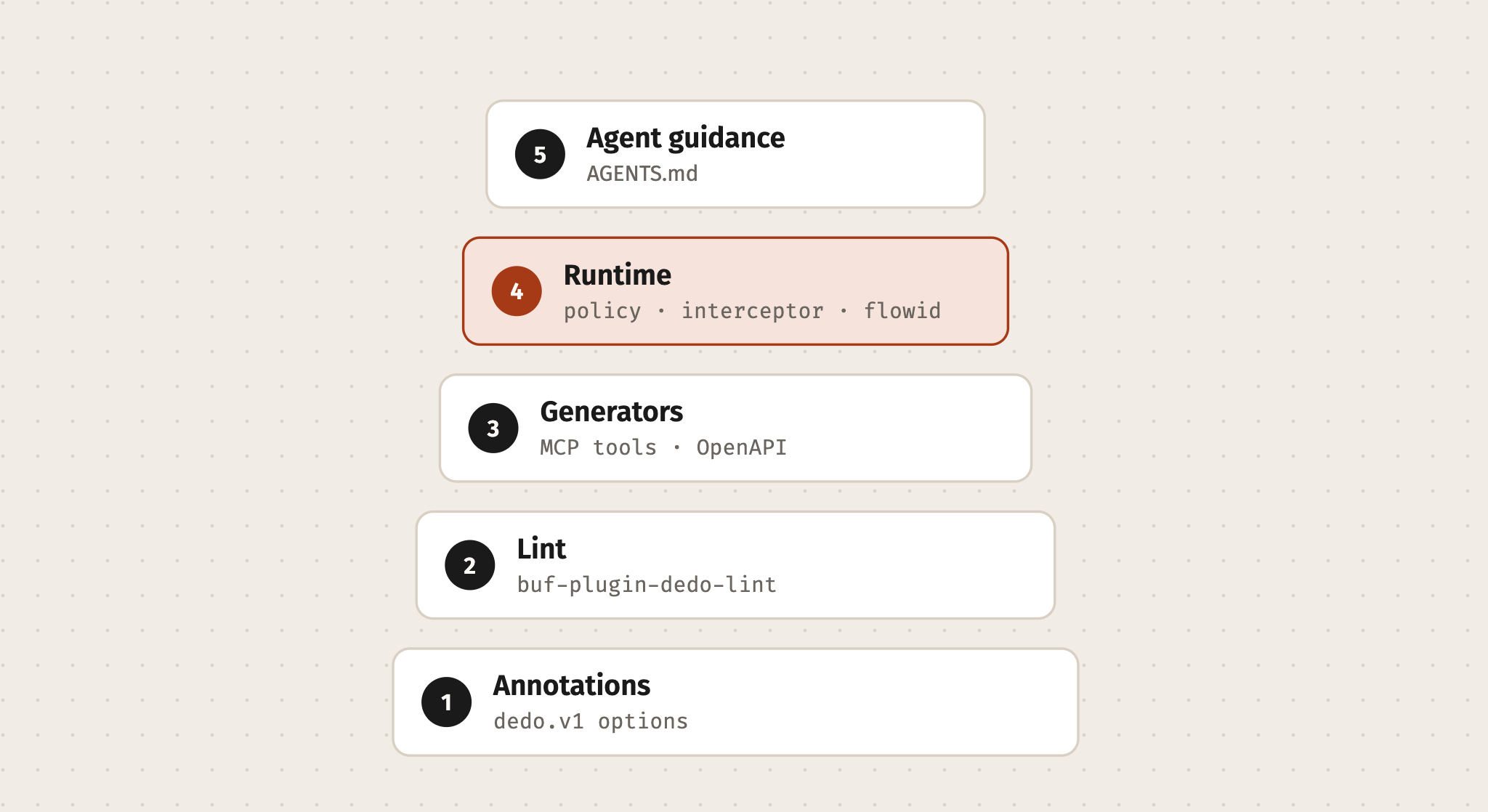
dedo is built for that service. It installs in layers. Each layer works on its own.
You can stop after any layer and still be better off than before.
This post walks through the layers in order. Then it shows the one command that does them all.
The layers
| Layer | What you add | What you get |
|---|---|---|
| 1. Annotations | The dedo.v1 options module | A place in the proto for scopes, errors, cache, deprecation, tool text |
| 2. Lint | buf-plugin-dedo-lint | Findings in the editor and in CI, and breaking checks against main |
| 3. Generators | protoc-gen-dedo-mcp, protoc-gen-dedo-openapi | MCP tools and REST docs from the proto |
| 4. Runtime | policy, interceptor, flowid, Vanguard, mcpserver | Scopes enforced, headers set, every transport on one server |
| 5. Agent guidance | A section in AGENTS.md or CLAUDE.md | Coding agents that follow the same rules |
Before you start:
- You need Go 1.26 or later and the Buf CLI.
buf.yamlmust be version v2. If yours is v1, runbuf config migratefirst.
Layer 1: Annotations
Add the options module and the two modules it builds on:
# buf.yaml
version: v2
deps:
  - buf.build/googleapis/googleapis
  - buf.build/bufbuild/protovalidate
  - buf.build/r-a/dedo:v0.32.2Code language: YAML (yaml)
buf dep updateCode language: Bash (bash)Pin the label to the dedo release you use. The options, the lint rules that read them and the runtime that enforces them then agree. The label also names the lint plugin’s release.
Then import the options where you need them:
import "dedo/v1/options.proto";Code language: Protocol Buffers (protobuf)Nothing changes at runtime yet. Your protos still compile.
You have a vocabulary.
Layer 2: Lint
The lint plugin is not pinned in go.mod. The label from Layer 1 names its release. dedo tools installs it at that release into $GOBIN and copies it into .tools/:
dedo tools                       # installs the plugin at buf.yaml's release, copies it into .tools/
printf '.tools/\n' >> .gitignoreCode language: Bash (bash)
The plugin runs as a native binary. Buf starts it about a dozen times per lint, and the editor needs it fast.
Naming its release in buf.yaml means every laptop and CI run the same version.
Run dedo tools again after a fresh clone, an upgrade, or a change to the rules you choose below. dedo install only puts the plugin in $GOBIN. Without the dedo command, go install github.com/raveesh-me/dedo/lint/cmd/[email protected] and a copy into .tools/ do the same as dedo tools.
List the plugin and its two categories in buf.yaml: DEDO for its lint rules and DEDO_BREAKING for its breaking rules. Choose its rules in the lint and breaking sections of dedo.yaml next to it:
# buf.yaml
lint:
  use:
    - STANDARD
    - COMMENTS
    - DEDO       # dedo's lint rules
breaking:
  use:
    - FILE
    - DEDO_BREAKING  # dedo's breaking rules
plugins:
  - plugin: .tools/buf-plugin-dedo-lint

# dedo.yaml
lint:
  use:           # the rule sets that run
    - AIP_NOLANG
    - ZALANDO
    - DEDO
    - HOUSE
# breaking: without use, DEDO and HOUSE runCode language: YAML (yaml)
buf.yaml names the plugin once; dedo.yaml says which of its rules run, and which this service opts out of. The plugin skips a few AIP rules on purpose by itself, and RULES.md gives the reason for each.
Now run it:
make check # buf format, buf lint, buf breaking against main, dedo modulesCode language: Bash (bash)The breaking check runs Buf’s FILE rules and dedo’s ten breaking rules. They catch what FILE cannot see: an RPC that drops a scope, a REST path or an event type, or a field that becomes required. dedo modules checks that each module’s code stays in internal/<module>/, with no cycles between modules.
Expect a long list the first time.
That list is the most useful thing a migration produces.
It is the distance between your API today and the standard, one missing declaration per line. You do not have to clear it in one pull request.
Working through the list
Take one service at a time. For each RPC, ask the questions the lint asks:
- Who owns this service, and who may call it?
- Which scope grants access?
- Which errors can it return?
- Is it safe to retry? Is it safe to cache?
- How would an agent describe it?
Some answers will surprise you.
Most teams have never written down which errors an RPC returns. The first time they do, they find two that no client handles.
When a rule does not fit, say so in the file:
// buf:lint:ignore DEDO_HTTP_PATH_VERSION
// Legacy partners call /products directly. Retired with v2 in Q3.Code language: Protocol Buffers (protobuf)
A suppression with a reason is a decision a reviewer can agree with, or question.
Layer 3: Generators
Pin the generators as Go tools:
go get -tool google.golang.org/protobuf/cmd/protoc-gen-go
go get -tool connectrpc.com/connect/v2/cmd/[email protected]
go get -tool github.com/raveesh-me/dedo/mcp/cmd/[email protected]
go get -tool github.com/raveesh-me/dedo/openapi/cmd/[email protected]Code language: Bash (bash)
Add dedo’s two generators to buf.gen.yaml, next to yours:
plugins:
  # ...your existing generators stay as they are
  - local: ["go", "tool", "protoc-gen-dedo-mcp"]
    out: gen/go
    opt: paths=source_relative
  - local: ["go", "tool", "protoc-gen-dedo-openapi"]
    out: docs
    strategy: all
    opt:
      - title=Your API
      - server=https://api.example.comCode language: YAML (yaml)
If you use managed mode, keep dedo’s Go package out of your prefix. The last matching override wins:
managed:
  enabled: true
  override:
    - file_option: go_package_prefix
      value: github.com/you/your-service/gen/go
    - file_option: go_package_prefix
      module: buf.build/r-a/dedo
      value: github.com/raveesh-me/dedo/gen/goCode language: YAML (yaml)
Run buf generate. You now have:
<Service>MCPTools()for every service.- A
docs/openapi.jsonin OpenAPI 3.2. When the API spans several proto packages, it nests each service under its package, so the reference reads like the domain.
Layer 4: Runtime
This is the layer that touches production, so it deserves care.
dedo runs on connect-go v2. One connect.Server holds the interceptor chain. Every transport mounts on it.
table, err := policy.Build(productsv1connect.ProductServiceName)
if err != nil {
    return nil, err // a missing declaration stops the service here
}
guard, err := interceptor.New(interceptor.Config{
    Table:         table,
    Scopes:        auth.ScopesFromContext,
    EnforceScopes: false, // audit mode first
    Log:           log,
})
if err != nil {
    return nil, err
}

server := connect.NewServer(
    flowid.Interceptor(),
    auth.Interceptor(),
    guard,
    validate.NewServerInterceptor(),
)
productsv1connect.RegisterProductServiceHandler(server, products.NewProductService()) // internal/products

mux := http.NewServeMux()
connecthttp.Mount(mux, server) // Connect, gRPC, gRPC-Web
if err := vanguard.Mount(mux, server); err != nil { // REST
    return nil, err
}Code language: Go (go)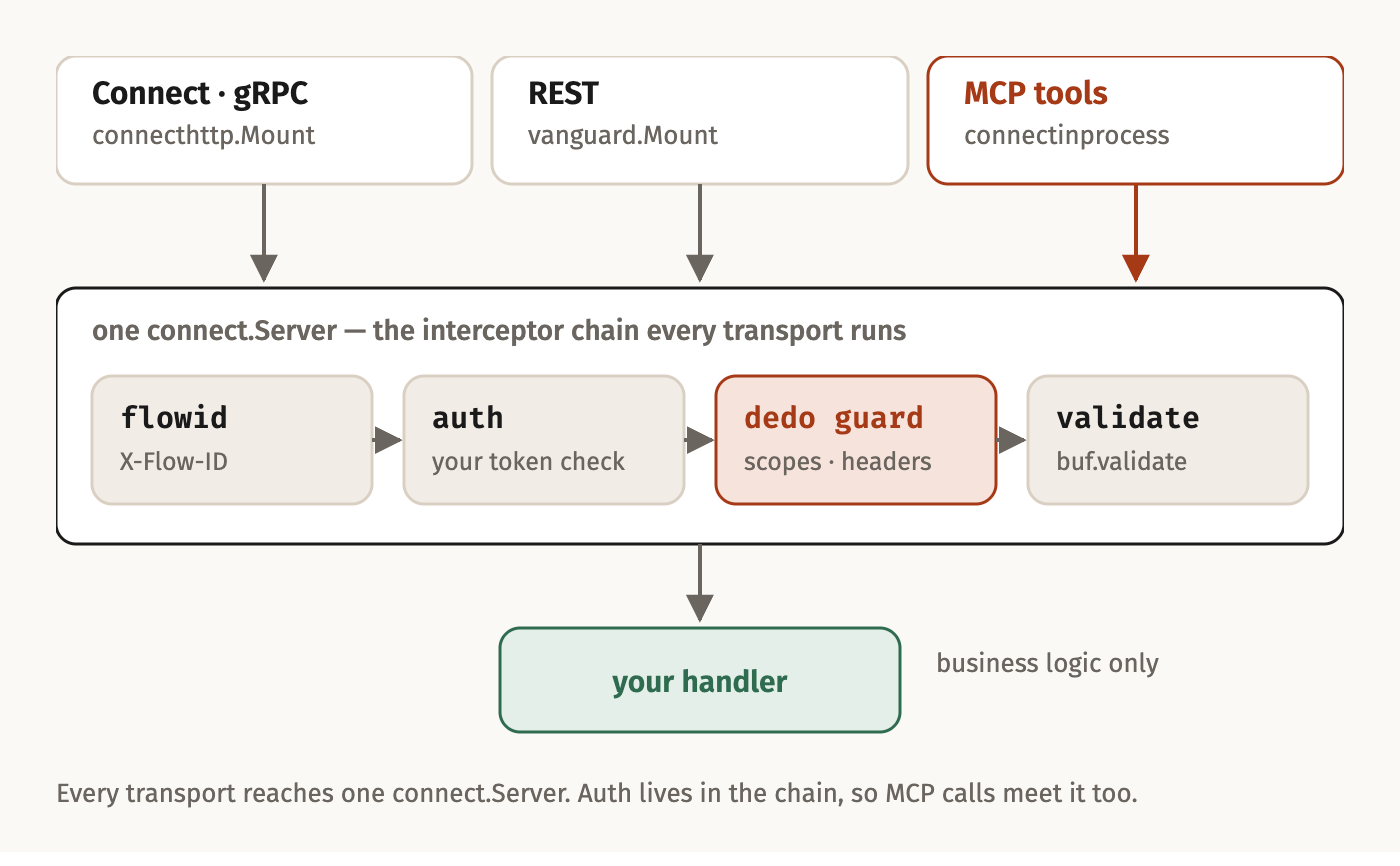
Three things matter here.
Auth belongs in an interceptor
Your existing service may verify tokens in HTTP middleware. Move that into a connect.ServerInterceptor.
MCP tool calls reach the server in-process, through connectinprocess. They never pass through HTTP middleware.
An auth check in HTTP middleware would let every agent through.
The interceptor’s job is small:
- Verify the token.
- Put the caller’s scopes in the context.
- Let dedo’s guard read them from there.
Audit before you enforce
EnforceScopes: false is audit mode.
The guard checks every call against the declared scopes. When a caller lacks one, it logs a warning with the procedure and the flow ID. Then it lets the call through.
Ship that, and watch the logs for a release cycle. Every warning is one of three things:
- A scope you named wrong in the proto.
- A token issuer that grants the wrong scopes.
- A caller that should not have access.
Fix the first two and decide about the third. When the logs are quiet, set EnforceScopes: true.
You learn what enforcement would do before it does it.
Fail closed at startup
Keep the policy-table test dedo init writes:
func TestPolicyTable(t *testing.T) {
    if _, err := policy.Build(productsv1connect.ProductServiceName); err != nil {
        t.Fatal(err)
    }
}Code language: Go (go)
Lint already requires scopes. The runtime checks again, because a missing scope at runtime means an open endpoint.
This test moves that failure from deploy to go test.
MCP and docs
Once the runtime is in, the last two doors are a few lines each:
client := connect.NewClient(connectinprocess.New(server))
tools := mcp.NewServer(&mcp.Implementation{Name: "products", Version: "v1"}, nil)
if err := mcpserver.AddTools(tools, client, productsv1.ProductServiceMCPTools()...); err != nil {
    return nil, err
}

mux.Handle("GET /openapi.json", docs.Spec())
mux.Handle("GET /docs", docs.Page())
mux.Handle("/mcp", flowid.Middleware(http.NewCrossOriginProtection().Handler(
    mcp.NewStreamableHTTPHandler(
        func(*http.Request) *mcp.Server { return tools },
        &mcp.StreamableHTTPOptions{Stateless: true, JSONResponse: true}))))Code language: Go (go)
Every tool call goes over Connect through the same server, with the same auth, scopes and validation.
/docs is Scalar, pinned by an integrity hash, with its hosted extras and telemetry off. make docs serves the reference alone on 127.0.0.1:8099, and make docs-tunnel shares it at a public trycloudflare.com URL until Ctrl-C. Neither shares the service itself: development tokens are often public. make docs-static writes the reference as one HTML file that opens from disk with no network, for a plane or an email; it inlines the OpenAPI document and the page’s script, checked against its integrity hash. dedo upgrade leaves an existing docs/index.html alone. When it differs from the release’s template, other than in its <title>, dedo upgrade says so and prints the command that refreshes it, dedo templates docs/index.html > docs/index.html. Then set its <title> again.
A tool call carries only the MCP request’s Authorization and X-Flow-ID headers. If your interceptors read another, such as an API version, forward it by name:
if err := mcpserver.AddToolsWith(tools,
    mcpserver.Options{Client: client, ForwardHeaders: []string{"Version"}},
    productsv1.ProductServiceMCPTools()...); err != nil {
    return nil, err
}Code language: Go (go)
Events, when a command declares them
Most services publish no events. When a command declares one in emits, its handler publishes through the events package. The bus is a driver you inject in main.go, in the pattern of database/sql/driver. dedo ships no broker driver, only one for tests.
An event carries the resource’s name and no payload. If the bus does not take it before the deadline, Publish returns UNAVAILABLE with EVENT_NOT_PUBLISHED, so the caller retries. Lint checks that the RPC declares that error.
Layer 5: Agent guidance
Coding agents write a lot of protos now. Teach them the rules too:
dedo init adds dedo’s guidance to AGENTS.md and CLAUDE.md, between <!-- dedo:begin guidance … --> and <!-- dedo:end guidance --> lines. A domains block follows it, mapping domain-driven design onto the API: the repository is the bounded context, a proto package a module, a service an aggregate. It also says where each module’s code and tables live, and how a service announces domain events, outward only. dedo upgrade rewrites both blocks, so keep your own notes outside them.
Your organisation’s own guidance goes in dedo.yaml‘s annexure. dedo adds it after its own, and where the two conflict, the annexure wins.
Or: one command
Everything above is what dedo init does:
go install github.com/raveesh-me/dedo/cmd/dedo@latest
dedo initCode language: Bash (bash)
It adds what is missing and keeps what is there. Your deps, plugins and comments stay, and Buf’s own categories and exceptions. A buf.yaml that chose dedo’s rules itself, as releases before v0.15.0 did, has that choice moved into dedo.yaml. So does a rules.yml from before v0.20.0. Running it twice changes nothing.
It reads your repository first:
| Your repository | What dedo init does |
|---|---|
Go module with protos and buf.gen.yaml | Keeps your generators, remote plugins included. Adds dedo’s two, writing to the same out with the same paths= option. Leaves managed mode as it is. |
Go module with protos, no buf.gen.yaml | Writes one with managed mode and four generators through go tool. |
Protos and buf.yaml, no Go | Adds the options module and the native lint plugin, in place of the BSR one. Go installs the plugin, but no go.mod is added. |
| Go module, no protos | Writes a starter service that passes lint. |
A few more details:
- It writes
main.go, and a handler stub for each service in its module’s package,internal/<module>/, only when you have none. When you have amain.go, it prints dedo’s beside yours to compare. - It names the services that declare nothing for dedo yet. Until they do, the lint lists what each RPC needs, and the policy-table test fails on purpose.
dedo init -offlineedits the files and prints thego,bufandmakecommands, so you can see what it will run first.
Staying current
dedo update     # installs the latest dedo
dedo upgrade    # moves this repository to itCode language: Bash (bash)
dedo upgrade moves four things together, as one release:
- the options module;
- the lint plugin;
- the generators;
- the runtime.
Then it refreshes buf.lock, copies the plugin at the new release into .tools/, rewrites the agent guidance and regenerates the code. A dedo.yaml with the old single rules section has it renamed lint, and its imports moved to the top of the file. buf.yaml gets DEDO_BREAKING beside FILE.
Coming from connect-go v1? It also runs connect-go’s own connect-go-v2-migrate and prints the new wiring beside yours.
A suggested order
For a team with a live service:
- Week 1. Annotations and lint. Make the findings visible. Fix nothing yet.
- Weeks 2–3. Declare one service end to end. Clear its findings.
- Week 4. Runtime in audit mode. Read the warnings.
- One release later. Enforce scopes.
- Then. Turn on MCP and docs. They come almost for free by now.
Each step ships on its own, and each one is reversible.
Next
dedo’s rules are a baseline. Your organisation has conventions of its own: domain names, REST roots, field naming.
The next post shows how to write those as lint rules, in a few lines of YAML.
The dedo series
- Part 1: Define Once, Deploy Everywhere: why one proto can carry the contract and its rules.
- Part 2: Getting Started with Todo Good and Todo Bad: two services, one interface, and what each lint rule protects you from.
- Part 3: Adding dedo to an Existing Service (this post): one layer at a time, with an audit mode before you enforce.
- Part 4: House Rules, Your Conventions as Lint: your organisation’s conventions as CEL checks, shared from one repository.
- Part 5: Multi-Tenant SaaS Auth: the tenant boundary, declared in the proto and enforced on every transport.
- Part 6: How fast is Dedo?: what dedo costs and saves, measured: getting started, lint, and MCP tool calls a second.
- Part 7: Forking dedo (You Probably Don’t Need To): why house rules and pins cover most needs, and how to run a fork when policy demands one.
- Part 8: Dedo Breaking Rules: what
buf breakingcannot see, and the rules that catch it before a client does.
Leave a Reply